
How to Search for Property in Northern California For Sale Near You!
Many of my clients start educating themselves about the real estate market about six months to two years prior to selling or purchasing a home. Some of my clients start looking on the on-line and social media ads and get overwhelmed by the intrusion of too many choices to sift through that may not match what they are looking for. To that end I have included a smart advanced search to allow you to narrow down the type of home, land, multi-residential, commercial, location and property features based on your needs, and we made it easy for you to search and save the search so you can monitor the market and make your decision when you’re ready.
Put yourself in charge - You'll be able to set-up your own search or several of them and when new listings come on the market you will automatically receive them every month, every week or every day; you're in charge of the frequency. If you see something you like, let me know and I'll request the disclosures and any reports, we can review and decide if we want to preview the property! If you would like me to set up your search, I'm happy to help!
Advanced Real Estate Search Capabilities
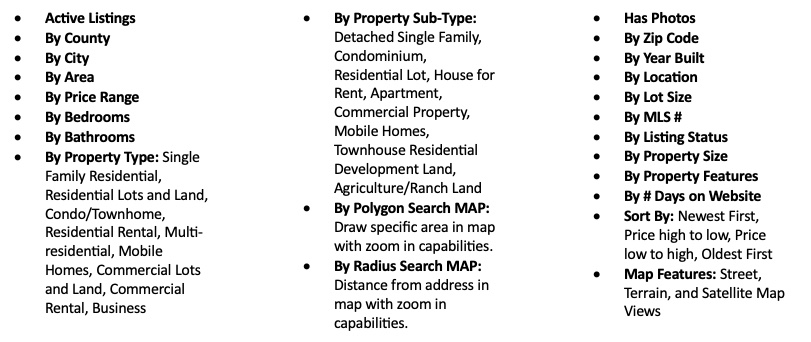
Here is a list of the many features to search and match your property criteria.
 Directions: From the home page click on either SEARCH LISTINGS from the top bar or under Start Searching click START SEARCH. Position the Map and center your search location. The listing for the entire area will show. Next click on the GREEN FILTERS button and narrow down your search (you'll be able to see several searches and can always add additional criteria or change parameters to the search), select Save Search.
At this point, you can choose a name for your search, such as "3 bedroom" or "Homes in a specific area." Once you've named and saved your search, you can quickly access this search from the Saved Searches folder in your account 24/7, you’ll receive a Saved Search Notification via email, and with one click you’ll be able to log back in.
You can create many saved searches and every time you select a saved search, your pre-selected search criteria will be applied to the listings, and you'll see all the properties that match your criteria. This feature can be a real time saver, as you don't have to enter the information every time you want to look for homes in different areas.
New listings matching your saved search criteria will be sent to you when a new listing comes on the market, you can choose Daily, Weekly, or Monthly frequency. This will keep you informed on the latest properties when they become available! When there is a property, you would like to see, let me know, I will send you any available disclosures, files, reports, and documents and schedule a preview at your convenience.
Use the MAP features to select certain areas! Locate an area on the map, enlarge, use the green pencil to select an area to search for homes in this specific area. This feature is great to select the desired neighborhoods by area, or if you want to be close to certain schools, beach, or parks!
You can also search homes for sale by neighborhoods:
Santa Cruz
- Santa Cruz Homes for Sale
- Homes for Sale in Santa Cruz Beach Boardwalk area
- Opal Cliffs Homes for Sale
- Seabright/Midtown Homes for Sale
- Twin Lakes Homes for Sale
- Eastside Homes for Sale
- Homes for Sale in Live Oak/Pleasure Point
- Homes for Sale in UC Santa Cruz area
- Homes for Sale in Westside Santa Cruz
- Pasatiempo Homes for Sale
Scotts Valley
- Homes for Sale in Scotts Valley
- Glenwood Estate Homes for Sales
- Granite Creek Estates Homes for Sale
- Monte Fiore Homes for Sale
- Scotts Valley Heights Homes for Sale
- Skypark Homes for Sale
- Rolling Woods Homes for Sale
- Homes for Sale in The Vineyards
- Woods Cove Homes for Sale
Los Gatos and the Santa Cruz Mountains
Capitola
- Capitola Homes for Sale
- Homes for Sale 41st Avenue area
- Capitola Village Homes for Sale
- Depot Hill Homes for Sale
- Jewel Box Homes for Sale
- Homes for Sale in Pleasure Point
San Lorenzo Valley
- San Lorenzo Valley Homes for Sale
- Felton Homes for Sale
- Homes for Sale in Brookdale
- Ben Lomond Homes for Sale
- Boulder Creek Homes for Sale
- Zayante Homes for Sale
Aptos
- Aptos Homes for Sale
- Aptos Village Homes for Sale
- Aptos Hills Homes for Sale
- Rio Del Ma Homes for Sale
- Homes for Sale in Seascape
- Seacliff Homes for Sale
- Homes for Sale in La Selva Beach
Watsonville
- Watsonville Homes for Sale
- Homes for Sale La Selva Beach
- Freedom Homes for Sale
- Homes for Sale in Downtown Watsonville
Use our advanced search features when you're ready to look for Homes for Sale in Soquel, CA.
Other Search criteria
- Luxury Homes for Sale in the Bay Area
- Beachfront and Ocean View Homes for sale
- New Construction Property for sale
- Multi-Residential properties for sale
- Residential Lots for sale
- Commercial Property for sale
- Mobile Homes for sale
- Search for Homes by Zip Code
- Luxury Residences on golf courses in Pasatiempo or Pebble Beach CA Luxury Homes.
- Premium properties with stunning views of the Golden Gate Bridge or the city skyline.
- Luxury Homes for Sale in Los Gatos, CA
- Silicon Valley CA Luxury Homes for Sale
- Santa Cruz County CA Luxury Homes for Sale
- Monterey County CA Luxury Homes for Sale
- Luxury Homes for Sale in San Mateo County CA
- Alameda County CA Luxury Homes for Sale
You can create many saved searches and every time you select a saved search, your pre-selected search criteria will be applied to the listings, and you'll see all the properties that match your criteria. This feature can be a real time saver, as you don't have to enter the information every time you want to look for homes in different areas. For help in searching, please view our search for homes near you.
Contact us anytime for one-to-one service and personalized information on the local real estate market. Call Paul Burrowes at 831-295-5130 or use the form below to tell us what you're looking for and start your home search right now.
FAQ - How to Search for a Home For Sale Near You!
- How do I start searching for property for sale in Northern California?
Begin by clicking SEARCH LISTINGS from the top navigation bar or START SEARCH on the home page. The map will display all available listings in the area. Click the GREEN FILTERS button to narrow your results by price, bedrooms, bathrooms, property type, and more to match your specific needs. - How far in advance should I start searching for homes in Northern California before buying?
Many buyers begin educating themselves about the Northern California real estate market six months to two years before purchasing. Starting early allows you to monitor market trends, track pricing, and make a confident, well-informed decision when you are ready to move forward. - Can I search for multiple types of properties in Northern California at the same time?
Yes! The advanced search tool allows you to filter simultaneously across Single Family Homes, Condos, Multi-Residential, Land, Commercial properties, and more across Silicon Valley, Santa Cruz, Monterey, and Santa Clara Counties all in one search session. - How do I save a property search so I don't have to re-enter my criteria every time?
After entering your search filters, click Save Search and give it a custom name such as "3 Bedroom Scotts Valley" or "Santa Cruz Condos Under $800K." Your saved search is stored in your account dashboard and accessible 24/7 with a single click. - How will I know when new properties matching my criteria come on the market in Northern California?
Once you save a search, you will automatically receive email notifications whenever a new matching listing becomes available. You control the frequency, choosing Daily, Weekly, or Monthly alerts so you stay informed at the pace that works best for you. - Can I search for homes near specific schools, beaches, or parks in Northern California?
Absolutely! Use the Map Polygon tool, the green pencil icon, to draw a custom search boundary directly on the map around your preferred schools, beaches, parks, or neighborhoods. This gives you precise control over exactly where you are searching. - What is the best way to search for property in a specific Northern California neighborhood?
Use the Radius Search to set a distance from a specific address or landmark, or use the Polygon Map Search to manually draw boundaries around your desired neighborhood. Both tools allow you to zoom in and focus your search on the exact communities you are considering. - Can I create more than one saved property search for different areas of Northern California?
Yes, you can create as many saved searches as you need. For example, you might save one search for Santa Cruz beachside condos, another for Scotts Valley single-family homes, and a third for Silicon Valley investment properties, each with their own custom criteria and alert frequency. - How do I get disclosures and reports on a Northern California property I am interested in?
When you find a property you would like to learn more about, simply send a message through the platform or call directly. Paul will request all available disclosures, inspection reports, and related documents and can schedule a convenient property preview on your behalf. - What if I need help setting up my Northern California property search?
If you would prefer personalized assistance, Paul is happy to set up your customized property search for you. Simply call or email to discuss your specific criteria, preferred areas, and timeline, and he will configure your search and saved alerts so you never miss a new listing.
- How do I start searching for property for sale in Northern California?
Begin by clicking SEARCH LISTINGS from the top navigation bar or START SEARCH on the home page. The map will display all available listings in the area. Click the GREEN FILTERS button to narrow your results by price, bedrooms, bathrooms, property type, and more to match your specific needs. - How far in advance should I start searching for homes in Northern California before buying?
Many buyers begin educating themselves about the Northern California real estate market six months to two years before purchasing. Starting early allows you to monitor market trends, track pricing, and make a confident, well-informed decision when you are ready to move forward. - Can I search for multiple types of properties in Northern California at the same time?
Yes! The advanced search tool allows you to filter simultaneously across Single Family Homes, Condos, Multi-Residential, Land, Commercial properties, and more across Silicon Valley, Santa Cruz, Monterey, and Santa Clara Counties all in one search session. - How do I save a property search so I don't have to re-enter my criteria every time?
After entering your search filters, click Save Search and give it a custom name such as "3 Bedroom Scotts Valley" or "Santa Cruz Condos Under $800K." Your saved search is stored in your account dashboard and accessible 24/7 with a single click. - How will I know when new properties matching my criteria come on the market in Northern California?
Once you save a search, you will automatically receive email notifications whenever a new matching listing becomes available. You control the frequency, choosing Daily, Weekly, or Monthly alerts so you stay informed at the pace that works best for you. - Can I search for homes near specific schools, beaches, or parks in Northern California?
Absolutely! Use the Map Polygon tool, the green pencil icon, to draw a custom search boundary directly on the map around your preferred schools, beaches, parks, or neighborhoods. This gives you precise control over exactly where you are searching. - What is the best way to search for property in a specific Northern California neighborhood?
Use the Radius Search to set a distance from a specific address or landmark, or use the Polygon Map Search to manually draw boundaries around your desired neighborhood. Both tools allow you to zoom in and focus your search on the exact communities you are considering. - Can I create more than one saved property search for different areas of Northern California?
Yes, you can create as many saved searches as you need. For example, you might save one search for Santa Cruz beachside condos, another for Scotts Valley single-family homes, and a third for Silicon Valley investment properties, each with their own custom criteria and alert frequency. - How do I get disclosures and reports on a Northern California property I am interested in?
When you find a property you would like to learn more about, simply send a message through the platform or call directly. Paul will request all available disclosures, inspection reports, and related documents and can schedule a convenient property preview on your behalf. - What if I need help setting up my Northern California property search?
If you would prefer personalized assistance, Paul is happy to set up your customized property search for you. Simply call or email to discuss your specific criteria, preferred areas, and timeline, and he will configure your search and saved alerts so you never miss a new listing.